

BigConfig: The "React" for Agentic DevOps
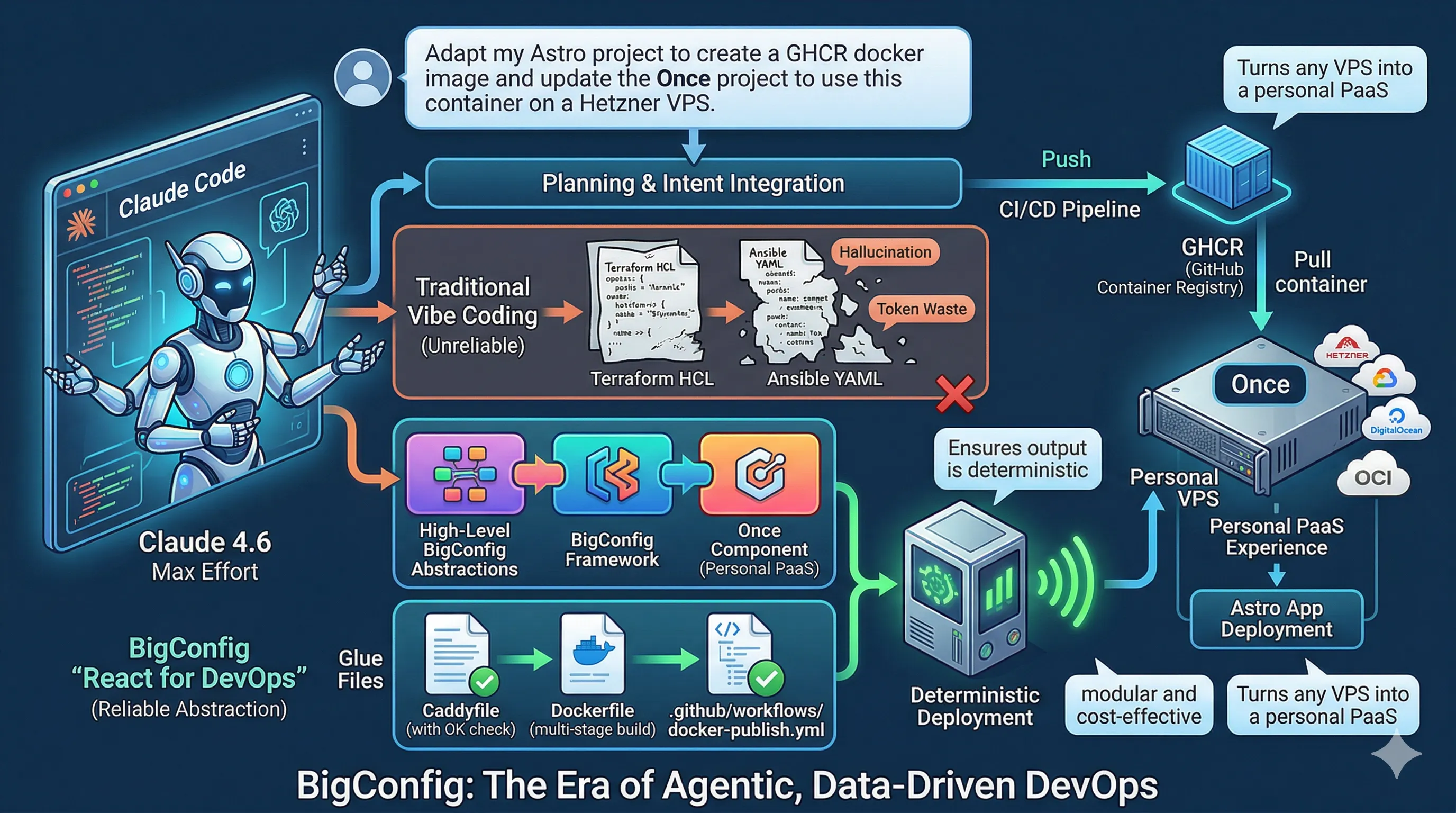

When you ask an AI to write a 500-line Terraform file, you are essentially asking it to write assembly code for your deployment. It’s brittle, verbose, and prone to “hallucinated” parameters.
The shift is simple: stop using DevOps tools like Terraform and Ansible directly. Instead, ask your Agent to use React-style components for DevOps. By shifting the Agent’s focus from “writing code” to “composing components,” you gain the same benefits developers got when they moved from jQuery to React: reusability, predictability, and a massive reduction in logic errors.
Enter BigConfig: the “React for DevOps.” It allows you to use high-level abstractions that ensure your Agent’s output is deterministic, modular, and cost-effective.
The Vision: Agentic + Data-Driven DevOps
Section titled “The Vision: Agentic + Data-Driven DevOps”By combining Claude Code (Max Effort with planning) with BigConfig and the once package, you create a platform-as-a-service (PaaS) experience—like Vercel or Netlify—but running on your own hardware. You don’t need to master Clojure or complex DSLs; you just provide the intent, and the Agent handles the implementation using reliable components.
The root directory
Section titled “The root directory”- Your App source code: An Astro managed via
pnpm. But Claude can adapt it to Rails/Django/Next/Phoenix/Spring. - BigConfig source code: The framework for “infrastructure components.” It reduces token consumption by using high-level abstractions.
- Once source code: A pre-built component implemented in BigConfig that turns any VPS into a personal PaaS.
- The Glue files: GitHub Actions and Docker to bridge your code to your cloud.
The Workflow: Zero-Touch Deployment
Section titled “The Workflow: Zero-Touch Deployment”I use Claude Code (4.6 Max Effort with planning) to manage the entire lifecycle. I create a directory containing everything and then I simply ask Claude to deploy.
Out of the box, this setup supports OCI, DigitalOcean, and Hetzner for compute, Resend for email, and Cloudflare for DNS. If you need a different provider, you don’t write the code; you just ask Claude to implement the main.tf for you.
1. The Web Server (Caddyfile)
Section titled “1. The Web Server (Caddyfile)”We use Caddy for serving the Astro SSG website. This handles our health checks too.
:80 {    handle /up {        header Content-Type text/plain; charset=utf-8        respond `OK` 200    }
    handle {        root * /srv        file_server    }}
2. The Container (Dockerfile)
Section titled “2. The Container (Dockerfile)”A multi-stage build that keeps our final image slim and secure. Note the inclusion of D2 for documentation as an example of a build of Astro with a plugin.
FROM node:22-alpine AS builder
RUN apk add --no-cache curl make && \    curl -fsSL https://d2lang.com/install.sh | sh
RUN corepack enable && corepack prepare pnpm@latest --activate
WORKDIR /app
COPY package.json pnpm-lock.yaml* ./RUN pnpm install --frozen-lockfile
COPY . .RUN pnpm build
FROM caddy:2-alpine
COPY Caddyfile /etc/caddy/CaddyfileCOPY --from=builder /app/dist /srv
EXPOSE 80
3. The Pipeline (GitHub Action)
Section titled “3. The Pipeline (GitHub Action)”This action builds the image for ARM architecture (optimized for modern VPS providers) and pushes it to the GitHub Container Registry (GHCR). Remember to make the image public.
name: Build and Publish Docker Image
on:  push:    branches:      - main # Adjusted to standard branch naming  workflow_dispatch:
env:  REGISTRY: ghcr.io  IMAGE_NAME: ${{ github.repository }}
jobs:  build-and-push:    runs-on: ubuntu-24.04-arm    permissions:      contents: read      packages: write
    steps:      - name: Checkout repository        uses: actions/checkout@v4
      - name: Log in to GHCR        uses: docker/login-action@v3        with:          registry: ${{ env.REGISTRY }}          username: ${{ github.actor }}          password: ${{ secrets.GITHUB_TOKEN }}
      - name: Extract Docker metadata        id: meta        uses: docker/metadata-action@v5        with:          images: ${{ env.REGISTRY }}/${{ env.IMAGE_NAME }}          tags: |            type=raw,value=latest            type=sha
      - name: Set up Docker Buildx        uses: docker/setup-buildx-action@v3
      - name: Build and push        uses: docker/build-push-action@v6        with:          context: .          push: true          tags: ${{ steps.meta.outputs.tags }}          labels: ${{ steps.meta.outputs.labels }}          cache-from: type=gha          cache-to: type=gha,mode=max
Summary
Section titled “Summary”To deploy, you simply point Claude to your root folder and say:
“Adapt my Astro project to create a GHCR docker image and update the Once project to use this container on a Hetzner VPS.”
Because of BigConfig, Claude isn’t guessing how to configure a server—it’s just filling in the props for a “Component” that already knows how to work. This is the future of DevOps: high level abstraction and Agents.